

Appearance
Store Endpoints
These endpoints are used to manage the stores of a vendor. This can also be done on the anybill Partner Portal.
The most important usecase of these endpoints is to enable larger companies to automate the process of syncing store details.
- GET
/v3/store - POST
/v3/store - GET
/v3/store/{id} - DELETE
/v3/store/{id} - GET
/v3/store/search
Detailed Endpoint Description
Staging Environment: SwaggerUI
Production Environment: SwaggerUI
Create Store
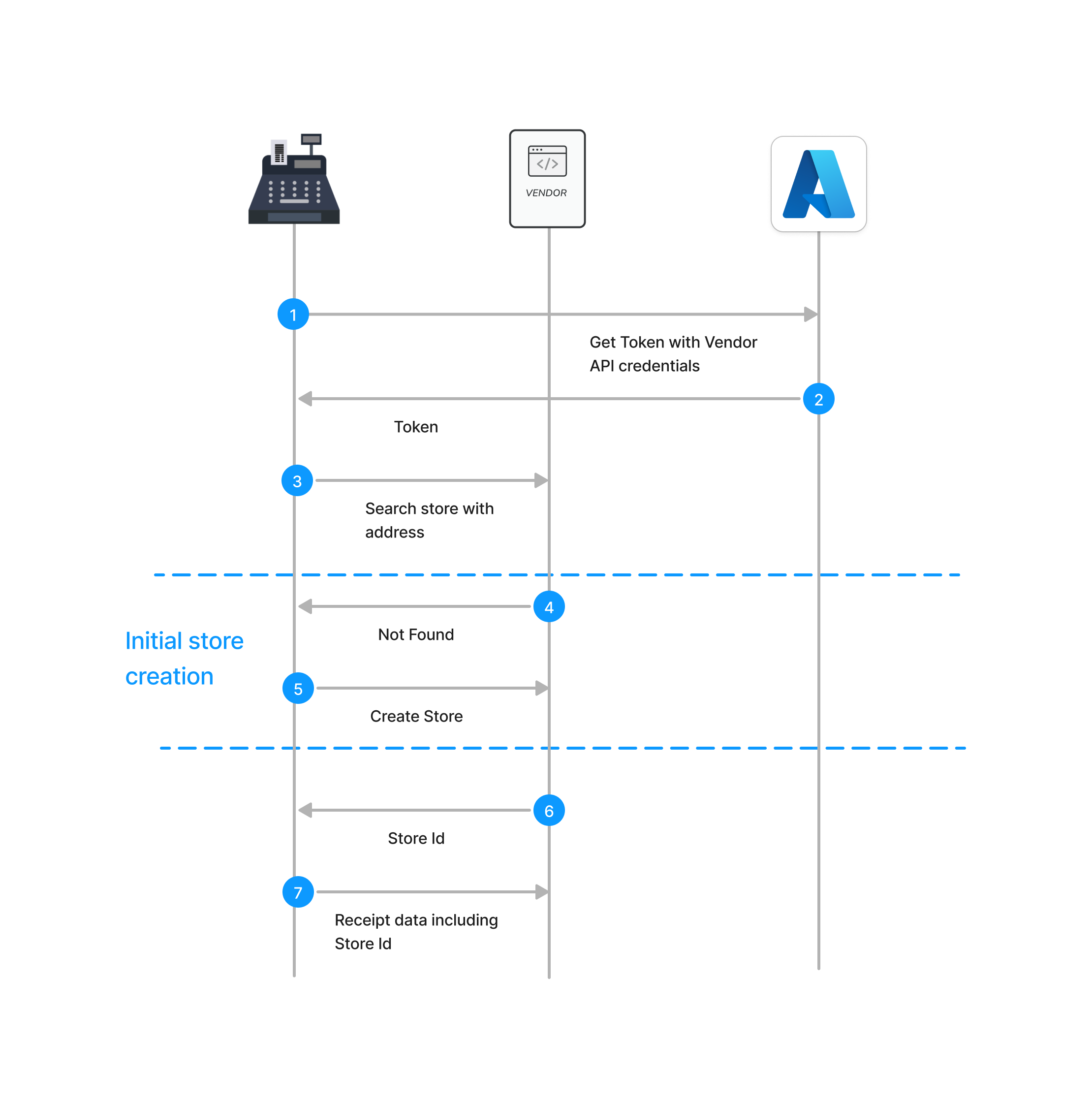
To automate the onboarding process of a merchant, anybill provides an endpoint to onboard and activate stores for digital receipts. This operation creates stores at anybill and assigns a unique Store ID. Additionally, this interface replaces the manual entry of stores in the Anybill portal. It can also be utilized in special cases, such as when store IDs cannot be manually entered into the cash register (e.g., due to a lack of a feedback channel to the cash register).
POST /v3/storeRequest Body:
json
{
  "id": "string",
  "displayName": "string",
  "legalName": "string",
  "address": {
    "countryCode": "string, ISO 3166-1 alpha-3",
    "zip": "string",
    "city": "string",
    "street": "string",
    "number": "string"
  },
  "vatId": "string",
  "language": "string, ISO 639-1"
}
Search store by address
Additionally, it can occur that cash registers in a shop cannot communicate with each other, and thus, calling the Create Store Endpoint might create duplicates. For this scenario, anybill provides the Search Store Endpoint, allowing you to check in advance whether a store already exists for the address integrated into the cash register. If no store exists, you need to create a store using the Create Store Endpoint. If a store already exists, the Store ID is returned, which should then be used in the receipt data for creating digital receipts.
Required Fields
These fields are validated against the OpenAPI schema. Fields listed as required once the surrounding object is sent belong to an optional part of the payload — omitting that part entirely is fine, including it makes the listed fields mandatory.
Generated from the production OpenAPI specification (API version 3.0) on 3 September 2026.
GET /v3/store
No required parameters and no request body.
POST /v3/store
Request body: UpsertStoreDto
Always required
| Field | Type | Description |
|---|---|---|
address | AddressDto | |
address.zip | string, 1–12 chars | Zip code / postal code of the address. |
address.city | string, 1–150 chars | City of the address. |
address.street | string, 1–150 chars | Street name of the address. |
Required once the surrounding optional object is sent
| Object | Position in the request body | Required fields |
|---|---|---|
StoreOpeningHoursDto | storeOpeningHours[] | dayOfWeek, open, close |
GET /v3/store/
| Name | Location | Type | Description |
|---|---|---|---|
storeId | path parameter | string | The id of the store. |
DELETE /v3/store/
| Name | Location | Type | Description |
|---|---|---|---|
storeId | path parameter | string | The id of the store. |
POST /v3/store/search
Request body: SearchStoreDto
Always required — none.
Required once the surrounding optional object is sent
| Object | Position in the request body | Required fields |
|---|---|---|
AddressDto | address | zip, city, street |