

Appearance
Loyalty Endpoints
Overview
anybill can act as a connector between POS systems and loyalty providers.
When a customer scans their loyalty card or QR code at the POS, transaction data - including loyalty information — can be transmitted through anybill to the corresponding loyalty provider.
How It Works
The loyalty integration extends the standard receipt submission with optional loyalty data.
When processing a transaction with loyalty participation:
- A transaction starts at the POS (e.g., QR code or customer card scanned).
- anybill transmits receipt and couponing information to the loyalty provider.
- The loyalty provider applies coupons and rewards.
- User and activated coupon data are returned.
- The final enriched receipt data is processed.
- A webhook is triggered and delivered to your system.
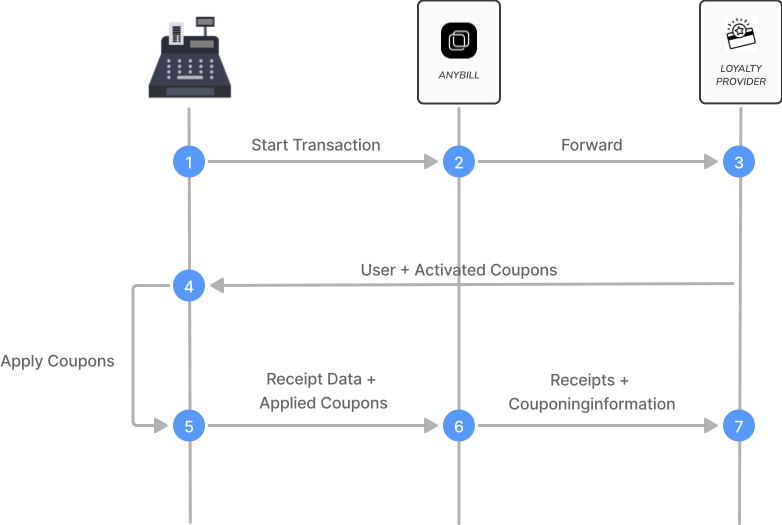
Starting a Loyalty Transaction
A loyalty transaction can be initiated via one of our loyalty endpoints.
When a user identifier (QR code, physical card, etc.) is scanned, you can use our loyalty endpoint to fetch activated coupons, collected points, or transaction IDs - depending on your loyalty partner.
Example Request:PUT /v3/loyalty/helloagain/transactions
json
{
  "customerId": "1332423432"
}
Example Response:
json
{
  "transactionId": "123",
  "customerId": "1332423432",
  "activatedRewards": [
    {
      "customIdentifier": "23432432"
    }
  ],
  "customFields": {}
}
Integration with Bill Endpoint
Loyalty transactions are submitted using the standard POST /v3/bill endpoint, with the following key components:
User Identification
Use the userIdentification object to link the receipt to a loyalty member:
- externalId – external customer system ID
Loyalty Payment Details
Include loyalty information (such as points, redeemed coupons, etc.) using the couponingInformation field inside the extension:anybill object.
Example:
json
{
  "extension:anybill": {
    "couponingInformation": {
      "type": "LoyaltyProviderType",
      "redeemedRewards": [
        {
          "identifier": "123456"
        }
      ],
      "transactionId": "12345"
    }
  }
}
Configuration
Loyalty integrations require configuration on the anybill side to connect with your specific loyalty provider.
Please contact anybill to:
- Set up your loyalty provider connection
- Configure the data format required by your loyalty system
- Enable loyalty webhooks for transaction notifications
💡 Tip:
The loyalty data structure is flexible and can be customized to match your loyalty provider’s requirements - including custom fields for transaction IDs, reward metadata, or program-specific attributes.
Required Fields
These fields are validated against the OpenAPI schema. Fields listed as required once the surrounding object is sent belong to an optional part of the payload — omitting that part entirely is fine, including it makes the listed fields mandatory.
Generated from the production OpenAPI specification (API version 3.0) on 3 September 2026.
PUT /v3/loyalty/transactions
Request body: LoyaltyTransactionInitiationDto
Always required
| Field | Type | Description |
|---|---|---|
externalUserId | string, non-empty | The loyalty user ID in the provider's system. |
DELETE /v3/loyalty/transactions/
| Name | Location | Type | Description |
|---|---|---|---|
transactionId | path parameter | string | The ID of the transaction to cancel |